Installation How To VistA/GT.M coLinux: Difference between revisions
| Line 2: | Line 2: | ||
==Quickstart coLinux== | ==Quickstart coLinux== | ||
1.The coLinux Wiki has adequate instructions. I will try to guide GT.M/VistA users to the most straight-forward route to a successful installation. There are many alternative configurations possible, some more problematic than others. | :1. The coLinux Wiki has adequate instructions. I will try to guide GT.M/VistA users to the most straight-forward route to a successful installation. There are many alternative configurations possible, some more problematic than others. | ||
2.CoLinux is delivered as a self-installing executable. We can either: | :2. CoLinux is delivered as a self-installing executable. We can either: | ||
a.Download coLinux-stable from sourceforge. (The current version as of this writing is 0.6.2-linux-2.6.10 found at: http://sourceforge.net/project/shownotes.php?release_id=302431) | :a. Download coLinux-stable from sourceforge. | ||
or : | :(The current version as of this writing is 0.6.2-linux-2.6.10 found at: http://sourceforge.net/project/shownotes.php?release_id=302431 ) | ||
b.Obtain a more recent snapshot of the current testing version from the wiki itself at http://www.colinux.org/snapshots/ | :or: '''(better)''' | ||
:b. Obtain a more recent snapshot of the current testing version from the coLinux wiki itself at http://www.colinux.org/snapshots/ I am working with the snapshot of version 0.6.3-pre13. | |||
:Note: this gets us stable-coLinux-20050524.exe which produces a specially patched kernel-2.6.11. | |||
3.The coLinux install can be anywhere on our XP machine. I have chosen to keep everything under '''C:\vfc\colinux''' . I will bold "'''C:\vfc\colinux'''" wherever a substitution should be made to use some other root directory. <br><br> | :3. The coLinux install can be anywhere on our XP machine. I have chosen to keep everything under '''C:\vfc\colinux''' . I will bold "'''C:\vfc\colinux'''" wherever a substitution should be made to use some other root directory. <br><br> | ||
Run the colinux.exe to get this installation dialog: | :Run the colinux.exe to get this installation dialog: | ||
[[Image:CoLinux_install.jpg|coLinux installation wizard]] | [[Image:CoLinux_install.jpg|left|coLinux installation wizard]] | ||
:I suggest selecting all four of these components unless this is not a virgin install. This saves some manual labor and potential confusion. <br><br> | |||
I suggest selecting all four of these components unless this is not a virgin install. | :[[Image:Destination_folder.jpg|left|C:\vfc\coLinux]]<br> | ||
This saves some manual labor and potential confusion. <br><br> | |||
[[Image:Destination_folder.jpg|C:\vfc\coLinux]] | |||
:Everything goes into our chosen directory: | |||
[[Image:Root_filesystem_image.jpg|left|debian]] | [[Image:Root_filesystem_image.jpg|left|debian]] | ||
:The next decision point is whether to download a root filesystem image. <br> | |||
:I use the debian default: | |||
<br> | |||
:[[Image:Vfc_colinux_dir.jpg|frame|left|We now have ''this'' in our coLinux root/install directory: '''C:/vfc/colinux''']] | |||
<br><br><br> | |||
---- | |||
1.The file Debian-3.0r2.ext3-mit-backports.1gb.bz2 needs to be expanded to its full size. I installed [http://www.7-zip.org/ 7-Zip] for that purpose. The expanded Debian-3.0r2.ext3-mit-backports.1gb occupies 1,048,576 KB. I moved the bz2 to my archive directory. | :1.The file Debian-3.0r2.ext3-mit-backports.1gb.bz2 needs to be expanded to its full size. I installed [http://www.7-zip.org/ 7-Zip] for that purpose. The expanded Debian-3.0r2.ext3-mit-backports.1gb occupies 1,048,576 KB. I moved the bz2 to my archive directory. | ||
2.Next is a swap file. There are utilities for rolling our own detailed on the Wiki. Or just download one from: http://gniarf.nerim.net/colinux/swap/ . It will need to be expanded from its .bz2 to the correct size. | :2.Next is a swap file. There are utilities for rolling our own detailed on the Wiki. Or just download one from: http://gniarf.nerim.net/colinux/swap/ . It will need to be expanded from its .bz2 to the correct size. | ||
3.Next, we must tweak our colinux configuration file to match this installation. This ships as default.colinux.xml and needs to be edited, thus: | :3.Next, we must tweak our colinux configuration file to match this installation. This ships as default.colinux.xml and needs to be edited, thus: | ||
<?xml version="1.0" encoding="UTF-8"?> | <?xml version="1.0" encoding="UTF-8"?> | ||
Revision as of 19:26, 11 September 2005

Quickstart coLinux
- 1. The coLinux Wiki has adequate instructions. I will try to guide GT.M/VistA users to the most straight-forward route to a successful installation. There are many alternative configurations possible, some more problematic than others.
- 2. CoLinux is delivered as a self-installing executable. We can either:
- a. Download coLinux-stable from sourceforge.
- (The current version as of this writing is 0.6.2-linux-2.6.10 found at: http://sourceforge.net/project/shownotes.php?release_id=302431 )
- or: (better)
- b. Obtain a more recent snapshot of the current testing version from the coLinux wiki itself at http://www.colinux.org/snapshots/ I am working with the snapshot of version 0.6.3-pre13.
- Note: this gets us stable-coLinux-20050524.exe which produces a specially patched kernel-2.6.11.
- 3. The coLinux install can be anywhere on our XP machine. I have chosen to keep everything under C:\vfc\colinux . I will bold "C:\vfc\colinux" wherever a substitution should be made to use some other root directory.
- Run the colinux.exe to get this installation dialog:

- I suggest selecting all four of these components unless this is not a virgin install. This saves some manual labor and potential confusion.

C:\vfc\coLinux

- Everything goes into our chosen directory:

- The next decision point is whether to download a root filesystem image.
- I use the debian default:
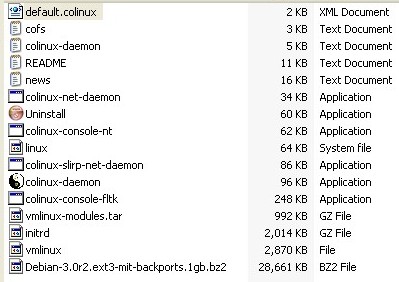
We now have this in our coLinux root/install directory: C:/vfc/colinux

- 1.The file Debian-3.0r2.ext3-mit-backports.1gb.bz2 needs to be expanded to its full size. I installed 7-Zip for that purpose. The expanded Debian-3.0r2.ext3-mit-backports.1gb occupies 1,048,576 KB. I moved the bz2 to my archive directory.
- 2.Next is a swap file. There are utilities for rolling our own detailed on the Wiki. Or just download one from: http://gniarf.nerim.net/colinux/swap/ . It will need to be expanded from its .bz2 to the correct size.
- 3.Next, we must tweak our colinux configuration file to match this installation. This ships as default.colinux.xml and needs to be edited, thus:
<?xml version="1.0" encoding="UTF-8"?>
<colinux>
<block_device index="0" path="\DosDevices\c:\vfc\coLinux\Debian-3.0r2.ext3-mit-backports.1gb" enabled="true" />
<block_device index="1" path="\DosDevices\c:\vfc\coLinux\swap_512Mb" enabled="true" />
<bootparams>root=/dev/cobd0</bootparams>
<initrd path="initrd.gz" />
<image path="vmlinux" />
<memory size="64" />
<network index="0" type="tap" />
</colinux>
4.With this much done, we should be able to boot coLinux.
I start inside the Command Prompt because it helps with debugging. We go to our colinux directory:
C:\>cd c:\vfc\colinux
C:\vfc\colinux>colinux-daemon.exe –c default.colinux.xml
Hang on! Here comes debian!

a.Root’s password is “root”
b.#df –h shows the partition /dev/codb0 is 14% used with 827Meg available.
c.Debian linux is all there and running.
d.#halt or #reboot exits the system.
5.Now we can make a colinux.default.bat file to boot the system. There is an option to use an nt console: Colinux-demon.exe –c default.colinux.xml –t nt
6.Networking: Now this is a whole special topic all its own. It is complex because the host XP operating system must own all the hardware devices. The hardware network interface is shared via a virtual connection from a phony NIC owned by coLinux. There are a couple of methods for accomplishing the link. In the end we should have a connection from within Linux that reaches the Internet via this virtual link.
Lots more to be added here :-)
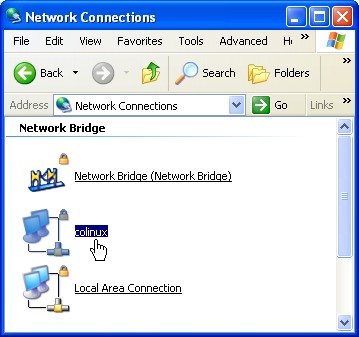


With the network interface up and running we have much nicer interface using putty. And it works from anywhere on our LAN, of course.
--gra'pa Z 08:36, 26 Aug 2005 (CDT)

