RPC HELP Tutorial Step 6: Difference between revisions
From VistApedia
Jump to navigationJump to search
No edit summary |
No edit summary |
||
| (2 intermediate revisions by the same user not shown) | |||
| Line 39: | Line 39: | ||
'''end;''' | '''end;''' | ||
* Include the | * Include the '''MFunStr''' unit in the Uses clause of your project's Pascal source file. This enables your application to use the [[RPC_HELP_M_Emulation_Piece|piece]] function included in mfunstr. Editor's note -- this is found in the BDK 'Source' folder. | ||
* Your user account must have [[RPC_HELP_XUPROGMODE|XUPROGMODE] key assigned. This allows your application to execute any RPC, without the RPC being registered. Later in the tutorial you will register your [[RPC_HELP_RPCs|RPC]]s. | * Your user account must have [[RPC_HELP_XUPROGMODE|XUPROGMODE]] key assigned. This allows your application to execute any RPC, without the RPC being registered. Later in the tutorial you will register your [[RPC_HELP_RPCs|RPC]]s. | ||
* Now run your application, and press the Retrieve Terminal Types button. It should retrieve and display terminal type entries, and appear as follows: | * Now run your application, and press the Retrieve Terminal Types button. It should retrieve and display terminal type entries, and appear as follows: | ||
[[Image:RPC_HELP_Tutorial_Step_6.png]] | |||
Now that you can retrieve a list of terminal type entries, the next logical task is to retrieve a particular entry when a user selects that entry in the list box. | Now that you can retrieve a list of terminal type entries, the next logical task is to retrieve a particular entry when a user selects that entry in the list box. | ||
Latest revision as of 15:38, 16 July 2015
Tutorial: Step 6 -- Call ZxxxTT LIST RPC
Now that you have created and tested the ZxxxTT LIST RPC on the VistA M Server, you can use your Delphi-based application's TRPCBroker component to call that RPC.
To call the ZxxxTT LIST RPC from your Delphi-based application to populate a list box:
- Place a TListBox component on your form. It should be automatically named ListBox1.
- Size it so that it uses the full width of the form, and half of the form's height.
- Place a button beneath ListBox1.
- Set its caption to 'Retrieve Terminal Types'.
- Size the button so that it is larger than its caption.
- Double-click on the button. This creates an event handler procedure, TForm1.Button1Click, in your Pascal source code.
- In the TForm1.Button1Click event handler, add code to call the ZxxxTT LIST RPC and populate the list box with the retrieved list of terminal type entries. This code should:
- Set RCPBroker1's RemoteProcedure property to ZxxxTT LIST.
- Call brkrRPCBroker1's Call method (in a try...except exception handler block) to invoke that RPC.
- Retrieve results from brkrRPCBroker1's Results property, setting them one-by-one into the list box's Items property.
This code should look as follows:
   Procedure TForm1.Button1Click(Sender: TObject);
   var
     i: integer;
   begin
     brkrRPCBroker1.RemoteProcedure:='ZxxxTT LIST';
     try
       {call begin}
       begin
         brkrRPCBroker1.Call;
         ListBox1.Clear;
         for i:=0 to (brkrRPCBroker1.Results.Count-1) do
           ListBox1.Items.Add(piece(brkrRPCBroker1.Results[i],'^',2));
       end;  {call end}
     except
       On EBrokerError do begin
         ShowMessage('A problem was encountered communicating with the server.');
       end;
     end;  {try end}
   end;
- Include the MFunStr unit in the Uses clause of your project's Pascal source file. This enables your application to use the piece function included in mfunstr. Editor's note -- this is found in the BDK 'Source' folder.
- Your user account must have XUPROGMODE key assigned. This allows your application to execute any RPC, without the RPC being registered. Later in the tutorial you will register your RPCs.
- Now run your application, and press the Retrieve Terminal Types button. It should retrieve and display terminal type entries, and appear as follows:
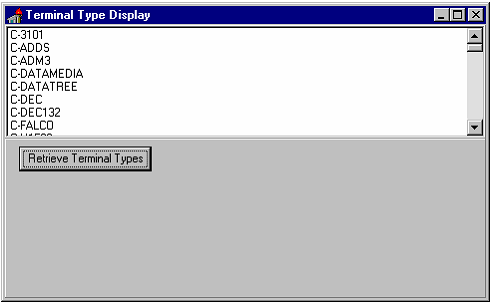

Now that you can retrieve a list of terminal type entries, the next logical task is to retrieve a particular entry when a user selects that entry in the list box.

